Answer from the deck
allow · always · denyAllow, Always allow or Deny the request Claude Code is waiting on. The key shows the tool and the command – and exactly what an Always would store.
▄▀█ █▀▄ █ █▀▄ █▀█ █▀▄ █   █▀▄ █▀▀ █▀▀ █▄▀
█▀█ █ ▀▄█ █▄▀ █▄█ █ ▀▄█   █▄▀ ██▄ █▄▄ █ █
a Stream Deck plugin for Claude Code
Andon Deck turns your Stream Deck into an andon board for Claude Code. Every key's border shows what Claude is doing – working, waiting for you, or stopped – so you can look away while it works. Approve tool calls from the deck, queue the next prompt, keep an eye on your plan limits. Free, local, open source.
for Stream Deck · Mini · XL · + · + XL · Neo · Studio · Pedal · Mobile · Virtual · Galleon 100 SD – Windows and macOS, Claude Code in WSL too
Claude is idle. The session key sleeps; the rest of the deck is ready.
On a factory floor, one light tells the whole hall what a machine needs. Your Stream Deck can do that for Claude.
Claude Code works for minutes at a time, then needs you for a second: a permission, a question, a finished turn. Andon Deck makes that second impossible to miss and quick to answer – the state lives on every key's border, readable out of the corner of your eye, and the answer is one press away.
Colour is reserved for machine state. Keys you press are graphite, so a lit key always means Claude is telling you something.
Allow, Always allow or Deny the request Claude Code is waiting on. The key shows the tool and the command – and exactly what an Always would store.
Line up “run the tests” or “commit” while Claude works; it starts the moment the turn ends. A clipboard key sends whatever you just copied, an error message for example.
Stop denies every further tool call, so Claude winds down and reports back. Autopilot approves read-only tools – or all of them – for a set time, counting down on the key.
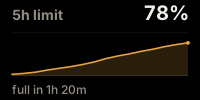
The 5-hour and weekly limits, live from Claude Code. If the current pace runs out before the reset, the key says when: full in 1h 20m.
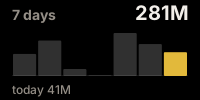
Tokens by hour and by day, read straight from Claude Code's transcripts – a full week of history from the first minute. On a dial, the curves draw themselves.
Up to four session keys, each with Clawd posed for its state, plus context pressure, the model in use and a turn timer. Pin one and every other key follows it.
On a permission request or a question, every connected deck switches to a full-screen Clawd waving across all its keys – whatever profile it was showing, OBS or Spotify included.
Ready-made profiles for every Stream Deck with keys, each built for its grid rather than cropped from a bigger one. Hold the Connect key to switch to yours.
Double-click the downloaded .streamDeckPlugin. Stream Deck installs it with its profiles.
The Connect key writes Claude Code's hooks for you – on Windows, macOS, or with Claude Code inside WSL. Your own hooks and status line stay as they are.
Start Claude Code as usual. The deck follows every session on its own; nothing to configure per project.
Issues and pull requests welcome – github.com/make-mcp/andondeck.